Online sau onsite, cursurile live de Productivitate conduse de un instructor îți arată cum să obții mai multă structură și productivitate în viață și la locul de muncă.
Trainingul de Productivitate este disponibil ca "online live training" sau "onsite live training". Onsite live training se poate desfășura local la sediul clientului în Sud-Vest sau în centrele de training corporate NobleProg din Sud-Vest.
NobleProg -- Furnizorul tău local de training
Bucharest, City Center
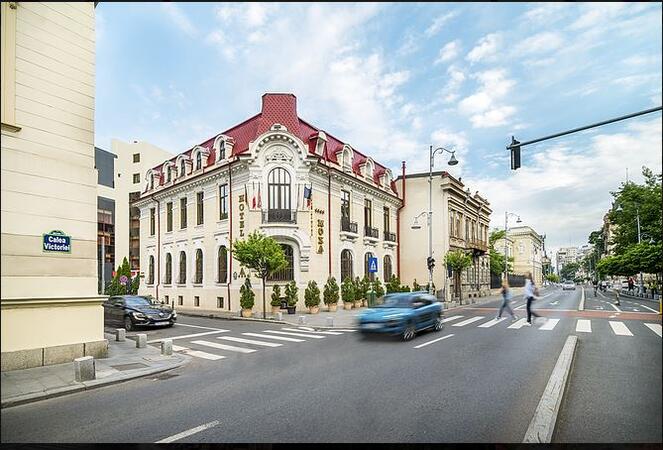
NobleProg București, 129 Calea Victoriei, București, romania, 010961
Le Boutique Hotel Moxa este situat pe una din cele mai vechi si mai cunoscute strazi din Bucuresti, numita Calea Victoriei, dar in acelasi timp aceasta zona este linistita. Este localizat langa multe atractii culturale si centre de afaceri. Centrul de conferinte are acces la gradina hotelului, si contine trei sali de conferinta, echipate cu cele mai noi tehnologii.
In apropiere se afla Ateneul Roman, Academia Roman, precum si cateva dintre cele mai importante muzee din Romania: Muzeul colectiilor de arta, Muzeul national George Enescu, Muzeul taranului roman.
Daca doriti o plimbare prin parc, chiar pe partea opusa a strazii se afla Parcul Nicolae Iorga, iar la cativa pasi distanta se afla Parcul Ion IC Bratianu.
Pentru cumparaturi in piata puteti merge la Piata Amzei iar pentru ceva mai distractiv si elegant in timpul serii puteti vizita Palace Casino Bucharest.
Pentru ajunge la le Boutique Hotel Moxa, folositi statiile de transport public Calea Victoriei sau Sfintii Voievozi.
ActiveOne Bucuresti
Strada Dr. Iacob Felix 55, Bucuresti, Romania, 011039
Transport In Comun
Tramvai Titulescu - 1 minut
Metrou Piata Victoriei - 5 minute
Gara De Nord - 10 minute
Autoturism
Gara De Nord - 3 minute
Centrul Vechi Bucuresti - 10 minute
Aeroportul International Henri Coanda - 17 minute
Parcare
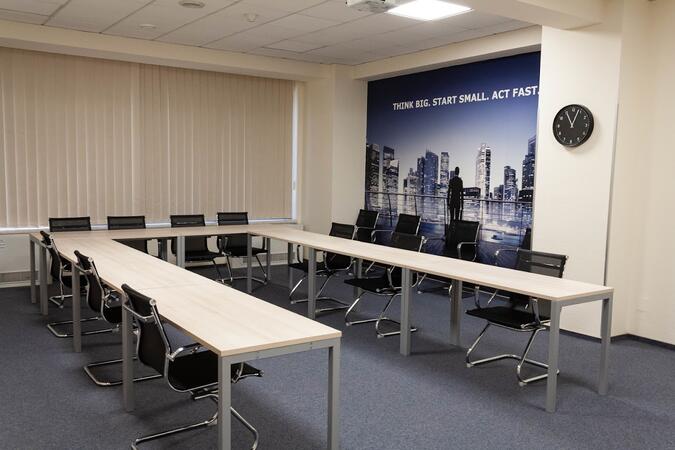
Fiecare sala detine un loc de parcare special rezervat pentru organizator sau trainer
A company hackathon lets teams from departments and IT try AI on their own problems and take working solutions with them. The format combines two discovery sessions beforehand with tool onboarding, a 24-hour sprint and a pitch to the management. Each team ends with a working solution and a usage plan for the following week.
This instructor-led, live training in Sud-Vest is aimed at: Mixed teams from departments and IT who want to try AI on their own problems and take working solutions with them.
By the end of this training, participants will be able to:
Formulate problems and bottlenecks in the own area as solvable challenges
Know eight to ten AI tools and select one for a task
Build a working solution in small teams
Evaluate solutions by benefit and feasibility
Present the result in a pitch
Define a plan for use in the following week
Format of the Course
Duration: 2 days on site (including a 24-hour sprint) plus two discovery sessions beforehand
Interactive training with a trainer, discussion and hands-on exercises on the participants' own use cases
Outcome, Beforehand: Challenges, tool selection and success criteria are defined.
Outcome, Day 1: Each team has a sharpened challenge and a first working version.
Outcome, Day 2: Each team has a working solution, a presented pitch and a plan for use from the following week.
Course Customization Options
To request a customized training for this course, please contact us to arrange.
This hands-on workshop is tailored to the tasks of one team and uses the AI tool already approved in the company. It covers prompting techniques, lasting setups such as projects and assistants, working with files and safe use. The group leaves with a shared prompt collection and solved tasks from its own daily work.
This instructor-led, live training in Sud-Vest is aimed at: Teams from case processing, specialist departments, research or IT support who already have first experience with AI and want better results for their own tasks.
By the end of this training, participants will be able to:
Understand what happens in the model when prompting and why models invent details
Write instructions with role, task, context, examples, format and limits
Break down large tasks and improve results in a targeted way
Use instructions, memory, projects and own assistants on a lasting basis
Work with files, scans, tables and research assignments
Verify results, recalculate figures and protect data
Secure own templates for the group and reuse them
Format of the Course
Duration: 1 day (7 hours) or 2 sessions of 4 hours per group, online or on site, up to 15 participants
Interactive training with a trainer, discussion and hands-on exercises on the participants' own use cases
Outcome, Block 1: Each participant has at least one verified template for their own work.
Outcome, Block 2: Each group has a shared prompt collection, a shared project and two solved tasks from real daily work.
Course Customization Options
To request a customized training for this course, please contact us to arrange.
Browser agents can read web pages, compare vendors and fill in forms on behalf of the user. This one-day course covers ChatGPT Agent and Atlas, Claude in Chrome and Perplexity Comet, suitable tasks and the risks, such as hidden instructions on web pages. Participants hand over two tasks, verify the results and define rules for the team.
This instructor-led, live training in Sud-Vest is aimed at: Specialist users, assistants and researchers who want to hand over recurring work on web pages and in web applications to AI agents.
By the end of this training, participants will be able to:
Understand how browser agents read pages, click and fill in forms
Classify ChatGPT Agent and Atlas, Claude in Chrome and Perplexity Comet
Select suitable tasks such as research, comparisons and form work
Formulate assignments with goal, limits and approval points
Recognize and limit risks such as hidden instructions on web pages
Define rules for use in the team
Format of the Course
Duration: 1 day (7 hours)
Interactive training with a trainer, discussion and hands-on exercises on the participants' own use cases
Outcome, Day 1: Each participant has handed over two tasks to a browser agent, verified the results and defined rules for use in the team.
Course Customization Options
To request a customized training for this course, please contact us to arrange.
Project work in Microsoft 365 spreads across Teams, Planner, Lists and SharePoint, and much of the effort goes into status reports and follow-up. This one-day course shows how Copilot and agents can support status reporting, meetings, tasks and risk detection. Participants build a project knowledge agent and a mock-up for a real project problem.
This instructor-led, live training in Sud-Vest is aimed at: Project managers, PMO staff, team assistants and project members who work in Microsoft 365 with Teams, Planner, Lists and SharePoint.
By the end of this training, participants will be able to:
Classify the agents in Microsoft 365 for project work
Create status reports from emails, meetings and lists with Copilot
Use agents in Teams and Planner for meetings and tasks
Build a project knowledge agent with documents, lessons learned and contacts
Make risks and delays visible earlier
Build a solution for a real project problem as a mock-up and present it
Format of the Course
Duration: 1 day (7 hours)
Interactive training with a trainer, discussion and hands-on exercises on the participants' own use cases
Outcome, Day 1: Each participant has a status report, a tested project knowledge agent and a presented mock-up for a real project problem.
Course Customization Options
To request a customized training for this course, please contact us to arrange.
Lovable builds web applications from natural language prompts, which makes it useful for internal tools, forms, dashboards and prototypes. This one-day course covers the interface, prompting, database, login and publishing, and ends with a published app and a started own use case. No programming skills are required.
The trainer, Tim Jamboula, is an official Lovable Ambassador and Cursor Ambassador.
This instructor-led, live training in Sud-Vest is aimed at: Specialist users, project leads, founders and teams who want to build internal tools, forms, dashboards or prototypes themselves.
By the end of this training, participants will be able to:
Understand how AI-assisted building works and when Lovable is the right tool
Operate the interface confidently, including Plan, Build and Visual Edits
Prompt according to five principles and use knowledge and skills
Set up database, login, storage and connectors
Publish an app safely and use the security scan
Start an own use case and know the next steps
Format of the Course
Duration: 1 day (7 hours)
Interactive training with a trainer, discussion and hands-on exercises on the participants' own use cases
Outcome, Day 1: Each participant has a published app with a database, login and live URL, and a started own use case.
Course Customization Options
To request a customized training for this course, please contact us to arrange.
Clickable prototypes created in hours can replace static mockups in discovery and stakeholder reviews. This one-day course shows product managers and designers how to build variants, map a design system, run live reviews and prepare the handover to development. Participants finish with a prototype for a feature of their own.
The trainer, Tim Jamboula, is an official Lovable Ambassador and Cursor Ambassador.
This instructor-led, live training in Sud-Vest is aimed at: Product managers, product owners, UX, UI and service designers, and discovery teams.
By the end of this training, participants will be able to:
Master the path from briefing to clickable prototype in a single session
Build several variants in parallel and refine them with user feedback
Map a design system, components and brand rules in Lovable
Run stakeholder reviews with working prototypes and live changes
Decide when to hand over to development and prepare the handover
Format of the Course
Duration: 1 day (7 hours)
Interactive training with a trainer, discussion and hands-on exercises on the participants' own use cases
Outcome, Day 1: Each participant has a clickable prototype for an own feature, a stored design system and a handover document for development.
Course Customization Options
To request a customized training for this course, please contact us to arrange.
This two-day course takes a team from a short briefing to a tested, published first version. It covers prototypes, data and roles, live iteration with stakeholders, testing with users, security, publishing and the handover to developers. Participants work on their own use case throughout.
The trainer, Tim Jamboula, is an official Lovable Ambassador and Cursor Ambassador.
This instructor-led, live training in Sud-Vest is aimed at: Product teams, innovation managers, founders and departments who want to turn an idea into a tested prototype and a usable first version.
By the end of this training, participants will be able to:
Build a clickable prototype from a short briefing
Iterate prototypes live with stakeholders
Set up data, roles, login and integrations
Test with real users and implement feedback
Prepare security, publishing and operation of a first version
Plan the handover to a developer team
Format of the Course
Duration: 2 days (7 hours each), 6 to 12 participants
Interactive training with a trainer, discussion and hands-on exercises on the participants' own use cases
Outcome, Day 1: Each participant has a prototype with a database and login that has been improved in a simulated stakeholder session.
Outcome, Day 2: Each participant has a published, tested first version of their use case and a handover document.
Course Customization Options
To request a customized training for this course, please contact us to arrange.
Microsoft 365 Copilot is built into Outlook, Teams, Word, Excel and PowerPoint and works with the data that users already have access to. This course shows how to prompt effectively, verify results and use Notebooks, Pages and agents. Participants finish with a first FAQ agent on a SharePoint knowledge base.
This instructor-led, live training in Sud-Vest is aimed at: Employees and departments with Microsoft 365 Copilot, from beginners to advanced users.
By the end of this training, participants will be able to:
Distinguish Copilot Chat and the Copilots in Outlook, Teams, Word, Excel and PowerPoint
Understand which data Copilot accesses and how permissions apply
Prepare emails, meetings, reports and presentations with Copilot
Analyze Excel data and verify the results
Prompt effectively and respond when the first answer does not hold up
Use Notebooks, Pages and the Researcher and Analyst agents
Build a first simple agent on a SharePoint knowledge base
Format of the Course
Duration: 2 days (7 hours each), also available as a learning journey in 2-hour sessions
Interactive training with a trainer, discussion and hands-on exercises on the participants' own use cases
Outcome, Day 1: Each participant has implemented at least one use case in the apps and has two saved prompts for their own work.
Outcome, Day 2: Each participant has a notebook, a verified Researcher result and a tested FAQ agent. Each group has presented a solution idea with a mock-up.
Course Customization Options
To request a customized training for this course, please contact us to arrange.
Reliable research needs more than a quick answer: sources have to be selected, checked and documented. This course covers Perplexity Spaces, deep research, Labs and the Comet browser, with a strong focus on source checking. Participants leave with a Space, a verified piece of research and a template for recurring assignments.
This instructor-led, live training in Sud-Vest is aimed at: Employees who research regularly, for example in purchasing, project work, knowledge management, assistance and specialist departments.
By the end of this training, participants will be able to:
Understand how Perplexity searches, selects sources and forms answers
Formulate research assignments with question, sources, exclusions and format
Check sources systematically and recognize errors in citations
Set up Spaces with instructions and files for topics and teams
Use deep research and Labs for reports and tables
Use the Comet browser safely for research and tasks on web pages
Format of the Course
Duration: 1 day (7 hours)
Interactive training with a trainer, discussion and hands-on exercises on the participants' own use cases
Outcome, Day 1: Each participant has an own Space, a verified piece of research with sources and a template for recurring research assignments.
Course Customization Options
To request a customized training for this course, please contact us to arrange.
Productivitate Cursuri in Sud-Vest, Sfarsit de saptamana Productivitate Cursuri in Sud-Vest, Seara Productivitate Training in Sud-Vest, Productivitate Cu instructor in Sud-Vest, Productivitate Instructor in Sud-Vest, Productivitate Cu instructor in Sud-Vest,Productivitate Clase in Sud-Vest, Productivitate Pe pagina in Sud-Vest, Productivitate Trainer in Sud-Vest, Productivitate Camp in Sud-Vest, Seara Productivitate Cursuri in Sud-Vest, Sfarsit de saptamana Productivitate Training in Sud-Vest, Productivitate Coaching in Sud-Vest, Productivitate Cursuri private in Sud-Vest, Productivitate one on one training in Sud-VestProductivity Cursuri in Sud-Vest, Sfarsit de saptamana Productivity Cursuri in Sud-Vest, Seara Productivity Training in Sud-Vest, Productivity Cu instructor in Sud-Vest, Productivity Cursuri private in Sud-Vest, Productivity Camp in Sud-Vest, Productivity Instructor in Sud-Vest, Productivity Coaching in Sud-Vest, Productivity Cu instructor in Sud-Vest,Productivity Clase in Sud-Vest, Seara Productivity Cursuri in Sud-Vest, Productivity Pe pagina in Sud-Vest, Productivity Trainer in Sud-Vest, Sfarsit de saptamana Productivity Training in Sud-Vest, Productivity one on one training in Sud-Vest